
A Small Business Guide to Building, Growing, and Selling with Shopify
Presented by Create Next

What’s covered in this guide
What is Shopify, exactly?
Platform Pricing (2026 Overview)
Why Brands Choose Shopify
What Can Shopify Do Out of the Box? (Zero Added Upgrades)
What Comes Included vs. What Needs an App?
Themes and In-Person POS
Managing Large Inventories and Broad Catalogs
How Shopify Helps Customers Find You: Search Engines
What is Shopify, exactly?
Shopify is an all-in-one commerce platform. It bundles hosting, security, payment processing, inventory, and website storefront design into one unified system built specifically for selling.
How is it different from other platforms?
Wix & Squarespace: Excellent page-builders for content and general websites, but commerce features are added on top of a general-purpose framework. So, their focus isn’t on creating the best e-commerce experience.
Shopify: Built for commerce first. Inventory management, a conversion-focused checkout, and shipping and fulfillment tools form the system's bedrock, not an afterthought.
Platform Pricing Overview
Shopify charges a monthly platform subscription fee, with discounts of roughly 25% if you choose annual billing. Here is how the tiers break down:
Starter — $5 USD / ~$7 CAD per month
Best for: Selling via social links and chat only (no full storefront).
Basic — $39 USD ($29 annual) / $49 CAD ($37 annual) per month
Best for: New and early-stage brands launching a complete online store.
Grow — $105 USD ($79 annual) / $132 CAD ($99 annual) per month
Best for: Growing brands that need staff accounts and advanced reporting.
Advanced — $399 USD ($299 annual) / $517 CAD ($389 annual) per month
Best for: Scaling businesses requiring custom report builders and lower credit card rates.
Plus — Starting at $2,300 USD / $2,300 CAD per month
Best for: Enterprise-volume brands needing custom checkout logic and dedicated support.
Key Takeaways:
Annual Savings: Paying annually saves roughly 25% across Basic, Grow, and Advanced plans.
No Long-Term Contracts: Subscription plans operate month-to-month and can be canceled at any time.
Official Rates: For complete details, visitshopify.com/pricing orshopify.com/ca/pricing.
Note: Platform fees do not include third-party apps, premium themes, or design/development fees.

Why brands choose Shopify
Right out of the box, Shopify gives you enterprise-grade infrastructure without requiring a tech team to maintain it:
Shopify Payments: Accept credit cards immediately without third-party merchant accounts. (Think Google and Apple Pay already working.)
Mobile Management: Manage orders, edit inventory, and view sales live from the official Shopify mobile app.
Built-in Analytics: Access real-time dashboards showing site traffic, conversion rates, and sales channels.
Social Commerce: Built-in integrations with Instagram, Facebook, TikTok Shop, and the Shop App (allowing customers to discover, buy, and track orders natively).
💡 The Create Next advantage: save while we build
When starting a new site with us, we build your store inside a Shopify Development Partner Environment. This means you don't pay Shopify a single dollar in subscription fees while we build. Your paid plan only begins on the day your store goes live. (Note: This applies to new accounts or stores willing to start a new store with us.)
What can Shopify do out of the box?
(Zero added upgrades)
If you want to keep your monthly fixed expenses minimal, a default Shopify build includes:
A complete, responsive online storefront with unlimited products
Integrated Shopify Email (free for up to 5,000 emails/month)
POS Lite for in-person sales (syncs stock automatically with pop-up sales)
Automated order status & abandoned cart emails
Basic sales and conversion reporting
Free themes (they’re like templates)
Who is a zero-upgrade build right for? Early-stage brands or businesses testing new concepts. It allows you to launch lean, generate revenue, and add specialized apps only as customer demand justifies it. This is a very bare-bones option, though. It’s functional and good enough to start selling and shipping with a nice, clean, easy-to-use site. But this option does not include what most consumers, or you, may be expecting from a more sophisticated e-commerce website you’re used to visiting.
What comes included vs. What needs an app?
Shopify provides a secure, lean foundation. To prevent system bloat, you add special capabilities modularly through Apps (listed in the Shopify App Store). Adding apps is like adding functionality only when you need it.
What would need an app? Here are some highly requested features that require app installation.
Loyalty programs
Membership/subscription programs
Product reviews
Product bundling
Wishlist for customers
Addition
👉 The above are just a few of the most commonly requested examples. The below shows apps in more categories so you can get an idea of what else is available.
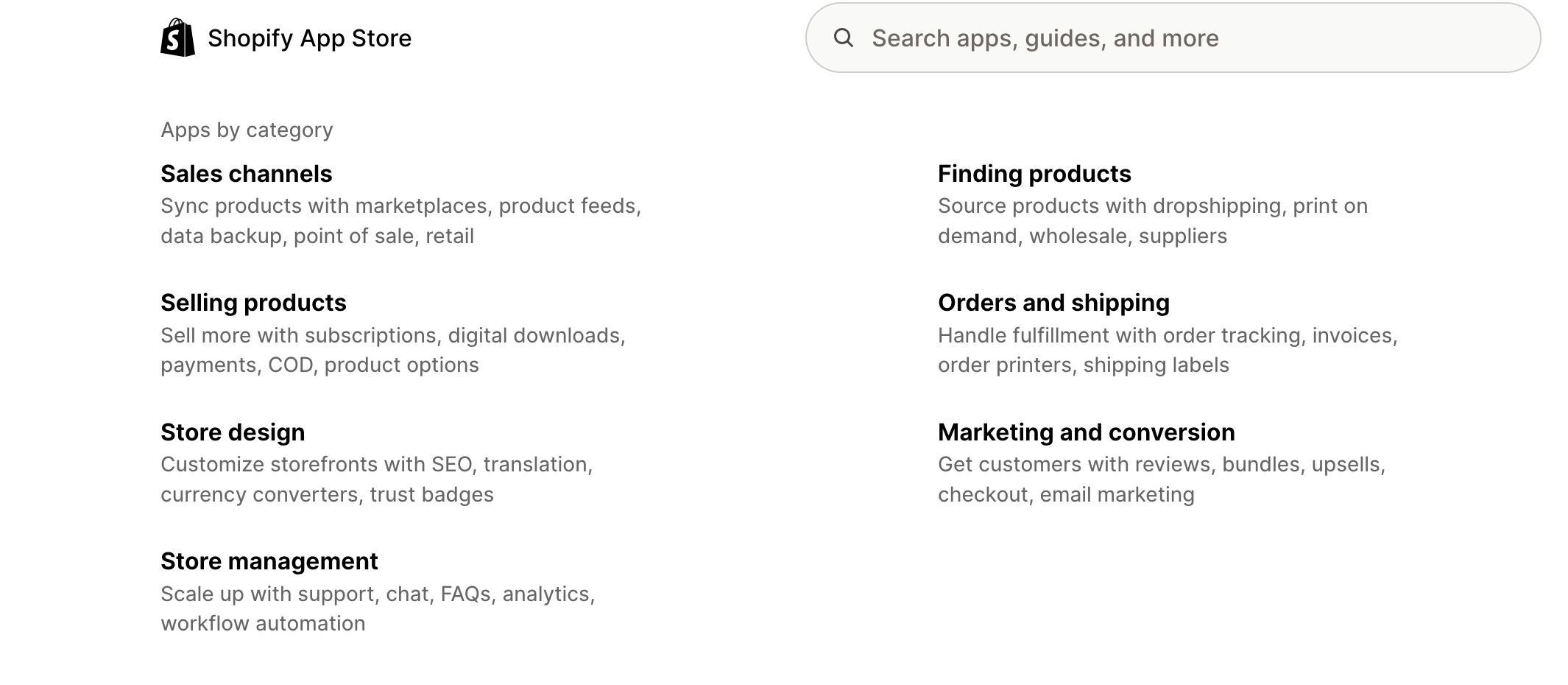
App Fees
Most apps operate on a monthly subscription ($10–$100+/month) based on features or store volume. Uncontrolled app usage can slow your site and inflate monthly costs, so we curate your store carefully.
💡 How does Create Next implement and set up apps?
Since many apps can do similar things, we often vet apps for fit, quality, and reviews before deciding which one to implement. Starting with the wrong app can waste time and cause frustration.
All app implementations include:
Discovery Phase:
Initial Consultation: We collaborate closely with you to define your business objectives and clarify the specific requirements for your app integration.
App Integration:
Installation and Configuration: Our team sets up and configures the app to match your project brief, tailoring settings and functionality to your store’s specific requirements.
Testing and Quality Assurance: We perform rigorous testing to verify seamless integration with your existing infrastructure and ensure all features operate without bugs or issues.
Client Training: To help your team feel fully confident using the new tool, we provide custom video instructions as needed, along with official help desk documentation and support resources.
Final Review and Adjustments: Together, we walk through the completed setup and apply your feedback to confirm everything runs as expected. This includes an initial review, up to two rounds of revisions, and a final sign-off meeting via Zoom or email.
Go Live: When launch day arrives, we help ensure a smooth transition, minimize operational disruptions, and monitor the integration closely to resolve any immediate post-launch questions.

Themes and In-Person POS
Themes
Your store's page layout is controlled by its Theme. Shopify offers high-quality free themes, as well as premium options ($150–$400+ one-time fee). A theme is similar to a template but closer to a blueprint for each page's structure rather than its styling, which can be changed.
Third-party developers develop themes and sell them on Shopify's theme marketplace. All stores must use a theme, whether it's a free theme developed by Shopify or from their third-party partners.
Are all themes created equal?
The short answer is no. Aside from their aesthetic. Themes come with different customizable page sections and varying levels of customization.
💡 Create Next’s Standard: We work with a curated list of fast, clean, trusted, and well-coded themes.
Multi-Channel Sales (In-Person & Pop-Ups)
Selling in person at markets, trade shows, or a retail store? Shopify POS shares inventory with your online shop in real-time. Selling a product at a pop-up updates your web stock count instantly, so you avoid overselling.

Managing large inventories and broad catalogs
When scaling to thousands of SKUs, manually assigning products to categories quickly becomes unmanageable. Shopify handles massive, complex catalogs through dynamic automation, deep taxonomy, and flexible frontend navigation.
Automated (Smart) Collections: Instead of adding products one by one, automated collections use rule-based logic to sort products instantly. You can set conditions based on product titles, variants, inventory levels, price, or vendor—for instance, automatically pulling any item with a price under $50 into a "Deals" collection, or any product with stock > 0 into an "In Stock" view.
Tagging Strategy: Tags act as micro-metadata attached to products (e.g., Material: Cotton, Season: Fall, Fit: Slim). Tags let you group items across categories without creating thousands of redundant collections, serving as the foundation for internal organization and search.
Organization by Product Type & Standardized Taxonomy: Shopify uses a standardized Product Category taxonomy alongside customizable Product Types. This taxonomy automatically maps items to standard e-commerce attributes, making bulk management, channel sync (e.g., Google Shopping), and top-level catalog organization uniform.
Custom Storefront Filtering: Using Shopify's Search & Discovery tool or custom metafields, you can build faceted navigation directly into collection pages. Instead of creating individual collections for every color or size combination, shoppers can dynamically filter high-volume collections by price, availability, material, or custom attributes without slowing down page load speeds.

How Shopify helps customers find you: search engines & AI
Driving traffic to your online store used to mean just one thing: ranking high on Google. Today, buyers search differently. Some still use traditional search engines, but millions now ask AI assistants like ChatGPT, Gemini, and Perplexity for direct recommendations (e.g., "Find me organic cotton toddler pajamas under $40").
Shopify handles both seamlessly by serving as your store’s engine for SEO (Search Engine Optimization) and AEO (Answer Engine Optimization).
Traditional SEO (Google & Bing)
Shopify comes with built-in technical features so traditional search engines can index and rank your products automatically:
Clean Site Architecture: Shopify builds automated sitemaps (a digital blueprint of your store) and submits them to Google so new products get discovered quickly.
Fast Page Speeds: High-performing code, built-in image compression, and global content delivery networks ensure your pages load instantly—a primary ranking signal for Google.
Built-In Metadata Tools: Easily edit page titles, descriptions, image alt tags, and readable web addresses (URLs) without touching code.
AEO & AI Discovery (ChatGPT, Gemini, Perplexity)
AI assistants don't just look at keywords; they read your store to understand facts, compare details, and make direct recommendations. Shopify lays the exact groundwork AI systems require:
Structured Data (Schema Markup): Shopify automatically formats your catalog into a standardized code language that AI models read. When ChatGPT asks, "What is this made of? Is it in stock? What does it cost?", Shopify delivers those exact facts clearly.
Syndication & AI Visibility: Shopify integrates natively with modern AI platform ecosystems, allowing AI engines to accurately read your inventory, recommend your products during a chat, and in some cases, let the user check out directly inside the AI interface.
Clear Product & Policy Data: AI models love clarity. Shopify's structure organizes your shipping rules, return policies, materials, and customer reviews into clean content blocks that AI assistants cite as trusted answers.
Ready to Transform Your Digital Storefront?
Your website should be more than just a place to host products. If you’re ready to move away from "standard templates" and toward a high-end, strategic design that moves the needle on these metrics, I’m here to help.